Development Architecture
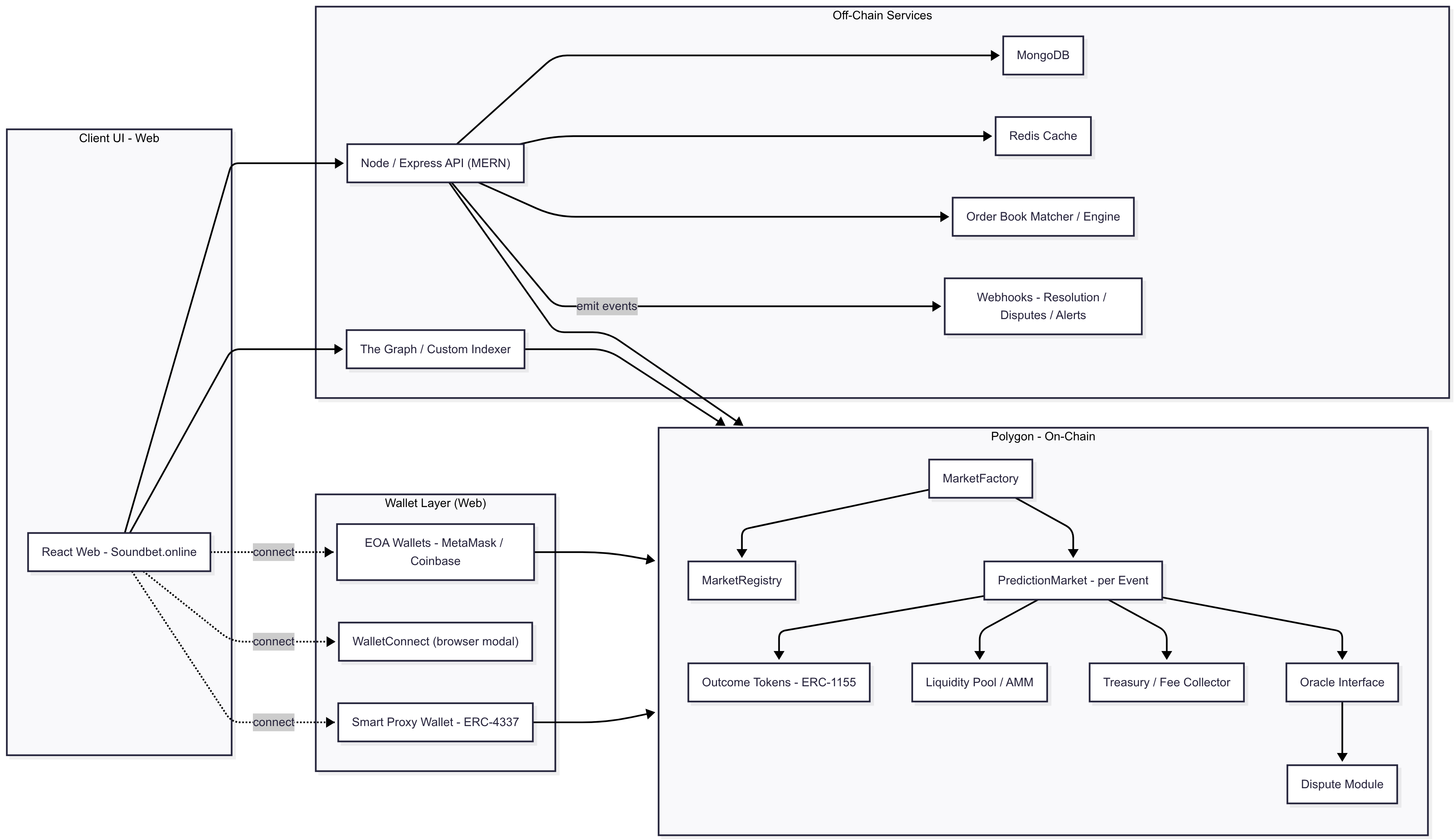
Development Architecture Overview in Description
- React Web – Soundbet.online
- Browser-based application for desktop and laptop users.
- Full trading, market browsing, news viewing, and wallet connection features.
- Connects to backend APIs and blockchain nodes directly.
- Flutter Mobile
- Cross-platform mobile app (iOS and Android).
- Optimized for mobile wallet connectivity (via WalletConnect deep links or in-app browsers).
- Mirrors web functionality with a mobile-first UI.
2. Wallet Layer
- EOA Wallets (MetaMask, Trust Wallet, Coinbase Wallet)
- Standard Ethereum-compatible wallets controlled by users.
- Sign and send transactions directly to the Polygon network.
- WalletConnect
- Protocol for connecting mobile wallets to both the web and mobile app.
- Enables trading from a mobile wallet app while interacting with the Soundbet.online interface.
- Smart Proxy Wallet (ERC-4337)
- Account Abstraction wallets auto-created on signup for each user.
- Acts as the "game wallet" to hold positions (ERC-1155 tokens) and winnings.
- Can sponsor gas fees via a Paymaster, improving UX for less experienced users.
Role: Provides secure, non-custodial transaction signing and storage of user assets (funds + position tokens).
3. Off-Chain Services
- Node / Express API (MERN)
- Backend application layer handling API requests from web/mobile clients.
- Manages user sessions, aggregates data from blockchain and databases, and orchestrates trades.
- The Graph / Custom Indexer
- Blockchain indexing service for querying on-chain market data efficiently.
- Powers fast market listings, historical price charts, and analytics.
- MongoDB
- Stores off-chain data such as user profiles, market metadata, news, comments, and aggregated trade/order book snapshots.
- Redis Cache
- Provides ultra-fast in-memory data access for frequently requested data (e.g., top markets, trending news).
- Order Book Matcher / Engine
- Matches buy and sell orders when the platform uses an order book model instead of AMM.
- Sends matched trades to the blockchain for settlement.
- Webhooks
- Sends real-time notifications for important events (e.g., market resolution, disputes, large trades).
Role: Enhances the platform’s performance, data aggregation, and user experience without holding custody of funds.
4. On-Chain Components (Polygon Network)
- MarketFactory
- Deploys new prediction market contracts for each news/event.
- Registers market details in the registry.
- MarketRegistry
- Stores addresses and metadata of all active markets for easy discovery.
- PredictionMarket
- Core smart contract for each event’s market.
- Handles trades, holds collateral, mints and burns position tokens, and manages resolution/payout logic.
- Outcome Tokens (ERC-1155)
- Represent YES/NO (or multiple) outcome positions for each market.
- Fully collateralized and held by user wallets or proxy wallets.
- Liquidity Pool / AMM
- Provides automated market-making, price discovery, and liquidity for trades.
- Treasury / Fee Collector
- Holds protocol fees and manages their distribution (e.g., to liquidity providers, platform treasury).
- Oracle Interface
- Fetches real-world results from trusted oracles (e.g., Chainlink, UMA) for market resolution.
- Dispute Module
- Allows community or governance participants to challenge oracle-reported outcomes before finalization.
Role: Enforces the trustless core of the platform, ensuring trades, payouts, and resolutions happen transparently on the blockchain.
5. Data & Transaction Flow
- User Access — A user visits via web or mobile and connects a wallet (EOA or proxy).
- Wallet Connection — If connected, the wallet address is displayed; if not, an error prompts retry.
- Market Interaction — Users browse markets/news, place YES/NO trades.
- Trade Settlement — Funds go from the user’s wallet directly into the market’s smart contract/liquidity pool.
- Positions & Proxy Wallet — Bought positions (ERC-1155 tokens) and any later winnings are held in the proxy wallet for that user.
- Data Sync — Off-chain services index blockchain data, aggregate order books, and cache results for fast UI rendering.
Trading — Buy (YES/NO) with Funds Flow
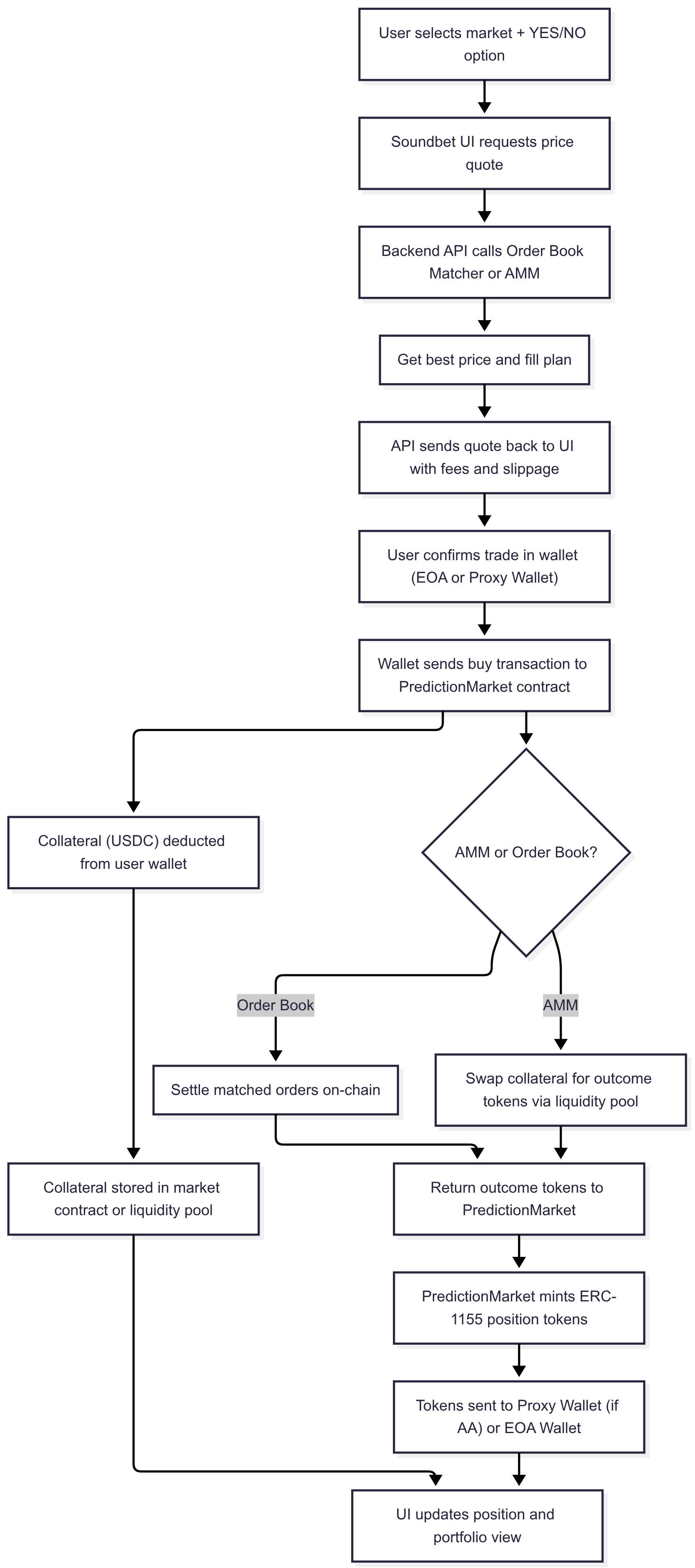
Here’s a step-by-step explanation of that corrected trading flow diagram, written in a way that’s clear for clients, developers, and documentation readers.
Trading Flow — Buy YES/NO Position
Step 1: User Chooses Market
- The user browses the list of active markets and selects a specific event/news item.
- They choose an outcome ("YES" or "NO") and enter the amount they wish to trade.
Step 2: Price Discovery
- The Soundbet UI sends a quote request to the backend API.
- The Backend API checks both:
- Order Book Matcher — to see if there’s an existing order that can be filled.
- Automated Market Maker (AMM) — to calculate the price based on the liquidity pool.
- The best price and fill plan are returned to the API.
- The API sends the final quote (including any fees and expected slippage) back to the user interface.
Step 3: Wallet Interaction
- The user confirms the trade from within their wallet:
- EOA Wallet (MetaMask, Trust Wallet, Coinbase Wallet, etc.)
- Smart Proxy Wallet (ERC-4337) if account abstraction is enabled.
- The wallet sends a signed buy transaction to the PredictionMarket smart contract on Polygon.
Step 4: Trade Execution
- The PredictionMarket contract determines the execution path:
- AMM Path: Collateral (e.g., USDC) is swapped for the desired outcome tokens in the liquidity pool.
- Order Book Path: The contract settles against an existing order on-chain via the order book engine.
- The resulting outcome tokens are returned to the PredictionMarket contract.
Step 5: Minting Position Tokens
- The PredictionMarket contract mints ERC-1155 position tokens representing the user’s stake in that outcome.
- These tokens are sent to the user’s wallet:
- If Account Abstraction is used, tokens are sent to the Proxy Wallet created at signup.
- Otherwise, they are sent directly to the user’s EOA.
Step 6: Funds Handling
- At the same time, the collateral (e.g., USDC) is deducted from the user’s wallet.
- These funds are locked inside the market contract or the liquidity pool until settlement.
Step 7: Completion
- The UI updates to reflect the new position:
- Shows the quantity of outcome tokens owned.
- Updates the portfolio view with the current value.
- The trade is now active and will remain open until the market is resolved or the user decides to sell.
Selling / Closing Position — Funds Flow (Flowchart Version)
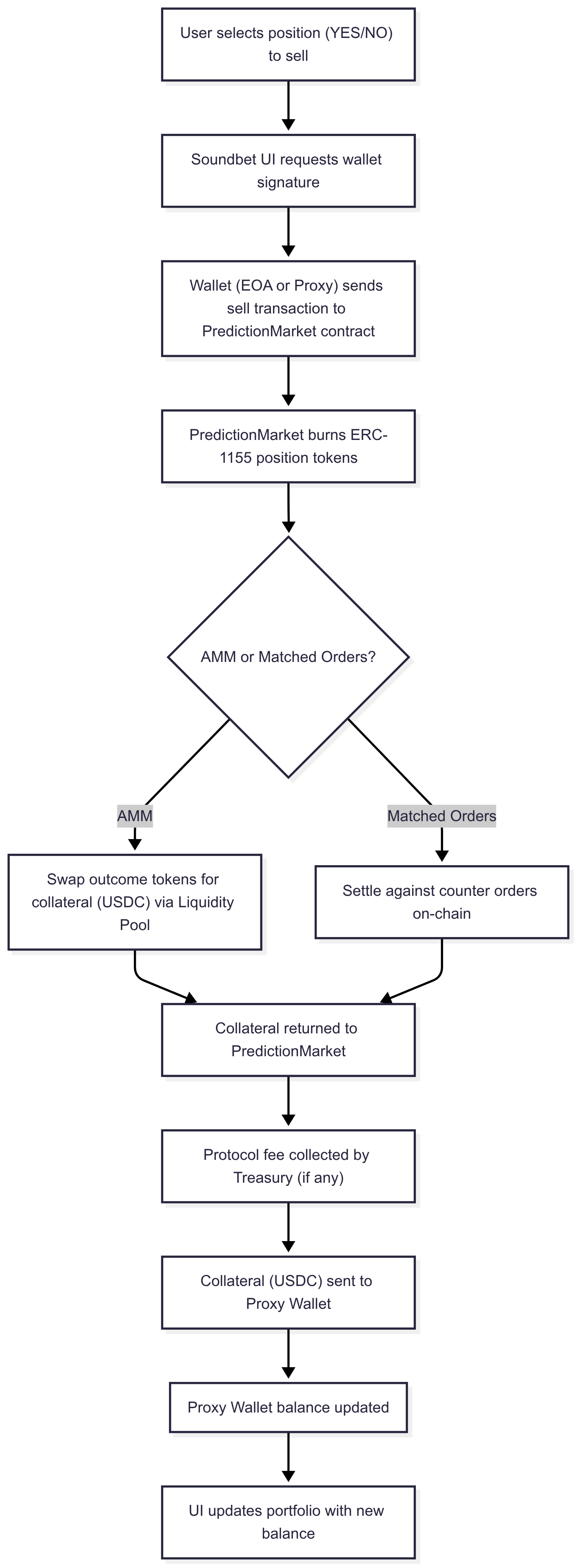
Step-by-step explanation for the Selling / Closing Position → Funds Flow diagram.
Step 1: Initiate Sell
- The user selects an active YES or NO position from their portfolio to close.
- They confirm the sale in the Soundbet UI.
- The UI prepares the transaction details and requests a signature from the connected wallet (EOA or Proxy Wallet).
Step 2: Transaction to Smart Contract
- The wallet sends a
sell()transaction to the PredictionMarket smart contract on Polygon. - This transaction includes:
- Which outcome is being sold.
- The amount (position size) to close.
Step 3: Burn Tokens
- The PredictionMarket contract burns the user’s ERC-1155 position tokens representing their stake in the market.
- Burning the tokens means the user no longer holds the position on-chain.
Step 4: Collateral Retrieval
- The contract checks how the position should be settled:
- AMM Path
- If using an Automated Market Maker (AMM), the position tokens are swapped for USDC collateral in the liquidity pool.
- The liquidity pool returns the equivalent amount of USDC to the PredictionMarket contract.
- Matched Orders Path
- If using an order book model, the position is matched and settled against counter orders directly on-chain.
- This match returns the USDC collateral to the PredictionMarket contract.
Step 5: Fees and Payout
- The Treasury contract collects any protocol fees (if applicable) from the returned USDC.
- The remaining USDC (after fees) is sent to the user’s Proxy Wallet.
- If the user does not have a Proxy Wallet (e.g., pure EOA user), the funds go directly to their connected wallet.
Step 6: Completion
- The Proxy Wallet balance is updated with the returned USDC.
- The Soundbet UI updates the user’s portfolio to:
- Remove the closed position.
- Reflect the new USDC balance.
- The user can now withdraw the USDC or use it to enter new trades.